Egypt
The 54Pay Collections API enables payment collections in Egypt through Fawry and Meeza payment networks. Both payment methods use the same API endpoint with different operator codes.
Authentication
All API requests require authentication using custom headers.
Required Headers
| Header | Type | Description |
|---|---|---|
| X-module | string | Base64(amount+transactionReference+customerNumber) |
| X-business | string | Base64-encoded Merchant Public Key: {Base64(Merchant Public Key)} |
| Content-Type | string | Must be application/json |
| x-app | string | Must be api |
Initiate Collection
POST https://subsidiary.dev.mypaygate.co/collection/v1/payin
Sample Request
curl --location 'https://subsidiary.dev.mypaygate.co/collection/v1/payin' --header 'Accept: application/json' --header 'X-module: {Base64(amount+transactionReference+customerNumber)}' --header 'X-business: {Base64(Merchant Public Key)}' --header 'Content-Type: application/json' --header 'X-app: api' --data-raw '{
  "requestHeader": {
      "clientId": "",
      "requestType": "Collections"
  },
  "customerName": "John Doe",
  "customerEmail": "john.doe@example.com",
  "customerNumber": "201000000000",
  "transactionReference": "QATXN64936072",
  "transactionDescription": "Test Transaction",
  "transactionAmount": 10,
  "transactionCurrency": "EGP",
  "transactionCountry": "EG",
  "successUrl": "",
  "errorUrl": "",
  "cancelUrl": "",
  "operatorCode": "EGFAW",
  "webhookUrl": ""
}'
Sample Response:
{
  "responseDetails": {
      "responseCode": "09",
      "responseMessage": "PENDING",
      "statusDescription": "<div style="font-family:Arial,'Helvetica Neue',Helvetica,sans-serif;color:#333" dir=rtl lang=ar><p>للدفع عن طريق فوري، يمكن استخدام كود الدفع المرجعي في الحاوية أدناه. اتبع الخطوات التالية لإتمام عملية الدفع باستخدام المحفظة الإلكترونية:</p><div style="background-color:#f2f2f2;padding:20px;text-align:center;margin:10px 0;font-size:24px;border-radius:5px"><strong>9874050123</strong></div><ol><li>اذهب إلى تطبيق المحفظة الإلكترونية الخاص بك.</li><li>اختر "فوري باي" من الخدمات المتاحة.</li><li>ادخل كود الدفع المرجعي الموضح أعلاه.</li><li>تأكد من صحة المعلومات وقم بالتأكيد لإتمام العملية.</li></ol><p>بديلًا، يمكنك الدفع نقدًا في أي متجر تابع لفوري بلس.</p></div>"
  },
  "transactionReference": "QATXN64936072",
  "otpIsRequired": false
}
Payment Completion
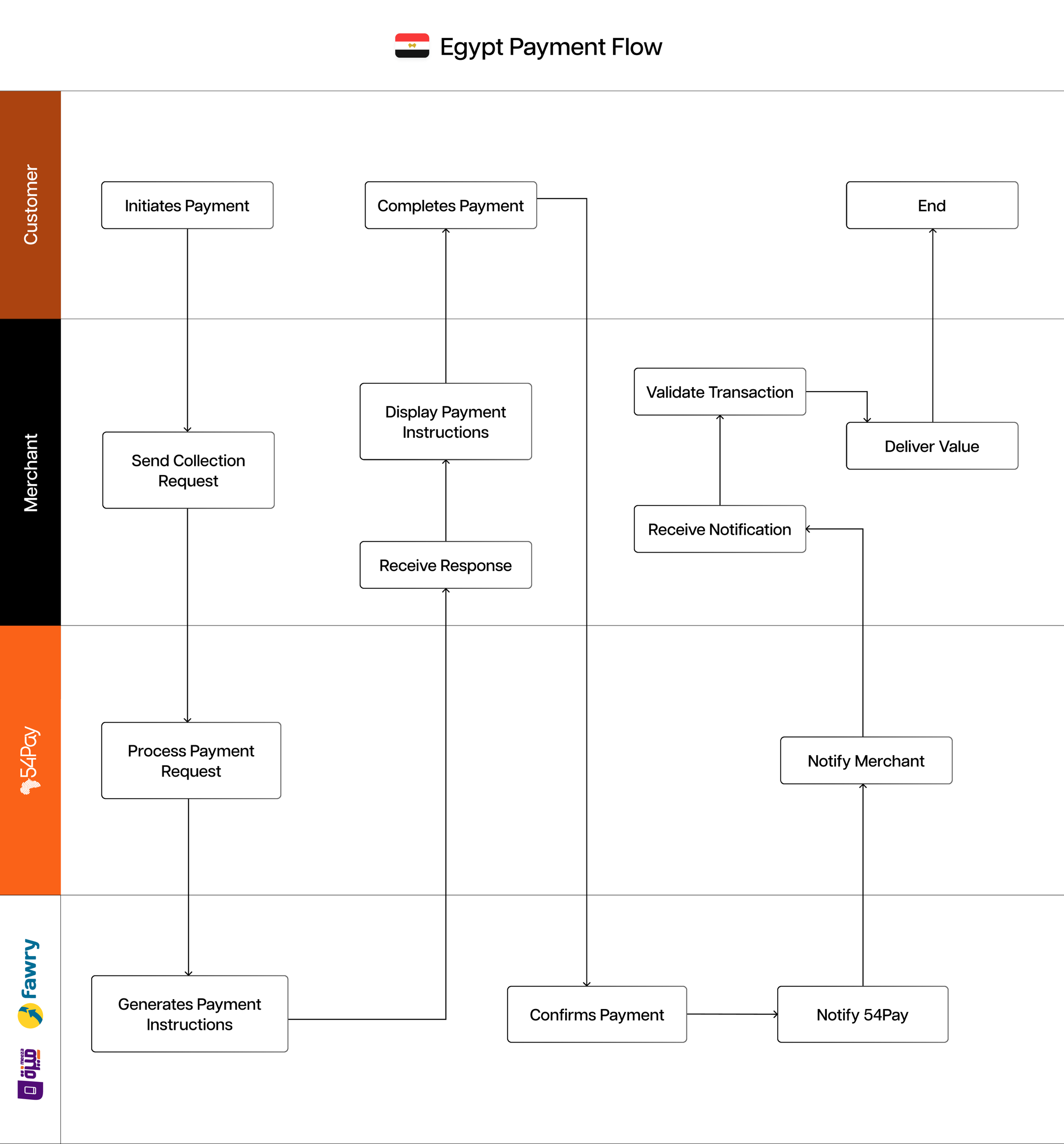
The API returns payment instructions in the statusDescription field as HTML content. Your application should:
- Parse the HTML response
- Display the content to the customer
- Monitor for webhook notifications to confirm payment
Webhooks
Payment Status Webhook
The API sends POST requests to your webhookUrl when payment status changes.
Sample Webhook
{
"transaction_reference": "176414160871313",
"transaction_status": "Funds Received",
"transaction_fee": 0,
"amount_received": 10,
"initiated_date": "2025-11-26 08:20:08",
"current_status_date": "2025-11-26 08:29:21",
"received_from": {},
"merchant_reference": "QATXN64936072",
"status": "COMPLETED",
"channel": "MOBILE_MONEY",
"currency_code": "EGP"
}
Webhook Status Values
| Status | Description |
|---|---|
| COMPLETED | Payment successfully received |
| FAILED | Payment failed or expired |
Webhook Implementation
Your webhook endpoint must:
- Accept POST requests: Listen for incoming webhook notifications
- Validate payload: Verify merchant_reference matches your records
- Return 200 OK: Respond within 5 seconds to acknowledge receipt
- Process asynchronously: Handle business logic after responding
- Handle duplicates: Implement idempotency using transaction_reference
Webhook Security
To ensure webhook authenticity:
- Verify requests originate from 54Pay IP addresses
- Validate the merchant_reference exists in your system
- Store webhook payloads for audit trail